Posted by Ken

Table of Contents

Off Topic – My Mod/Shader Setup

Published On: April 5, 2025/Categories: Off-Topic/

Hey Folks – Ken here,

I post a lot in the discord 📸︱screenshots channel. Mostly screenshots of the server, and various builds. In doing that, I’ve had some folks ask me about my shader setup. Today, I want to go over that in some detail.

To start off, I want to stress that I have a pretty high-end computer. It’s hardware is a couple generations old, but there’s not been significant headway in the hardware available since I purchased this computer. I want to list the specs below, just so that you’re aware of what I am working with. There are DEFINITELY things in this setup that you may need to change in order to have playable and consistent framerates, but I am going to go over some performance mods that I hope help with that too. Anyways, here are the specs for my desktop PC:

  • Operating System: Windows 11

  • Motherboard: Gigabyte Technology Co. Ltd. Z690 UD AX DDR4

  • CPU: 12th Gen Intel(R) Core(TM) i7-12700KF

  • GPU: NVIDIA GeForce RTX 3080

  • RAM: 32 GB DDR4
  • Storage: Samsung M.2 SSD

With all that being out of the way, let’s dive into what I use.

The Modrinth App/Launcher

I use modrinth to handle all my minecraft “instances”. It’s super easy to use, completely separate from the regular minecraft launcher. It supports Vanilla, Fabric, Forge, Neoforge and Quilt instances (My modded instance uses Fabric 1.21.1). It also lets you setup any version available for vanilla or the mod instances.

Then once you have an instance setup, you can go through mods, resource packs, and shaders – and it will automatically check for compatible versions with your modded instance, and version – to ensure you don’t have to manually figure it out. It also supports automatic updating for all the mentioned assets (One click button to auto update all to latest – but I still do this manually to ensure everything works still).

I am not going to cover this extensively, because it’s fairly simple to figure out, and there are tutorials everywhere (Here’s a good one that covers installing the app, using modpacks, and creating your own instances). I will however give you a modpack containing everything I use (as far as performance, and shaders) – at the bottom of this page.

The Performance/Visual Mods

Not all of these are necessary, but I am including everything I use for performance and visual elements to the game. The links will be to modrinth listings (because that’s what I use), but they may be available on other mod platforms:

There are many other mods I use for sound and item enhancements – but I want to make this the bare minimum to get shaders and performance mods. I may eventually do a full modpack you can download with every thing I use, but for now – this is a great starting point.

The Shaders

My shaders of choice are Photon V1.1 – it has THE BEST cloud system of any shader I’ve used, and one of the better lighting systems. It’s also got a great performance to look ratio. I am going to put a list with links to the main shader, and alternatives (and why you might use the alternatives):

  • 1
    Photon Shaders – The best by far, run this if you can. It will be included in the modrinth modpack towards the end of this page. I will also include a settings file that you can import (I customized the depth of field to be more realistic, and the water waves).
  • 2
    Complimentary Reimagined Shaders – A really solid substitute for Photon. Also has slightly better performance than Photon.
  • 3
    Bliss Shaders – Has an INCREDIBLE end world effect, and a pretty good nether (Both beat Photon), but the over world lighting is rough, and the non-development version does not support distant horizons. Performance is usually worse than Photon.
  • 4
    MakeUp Shaders – I have not personally tested this, but it looks solid – while claiming it has great performance. Based on it’s downloads, I think this is likely a good alternative if you can’t run the others well.

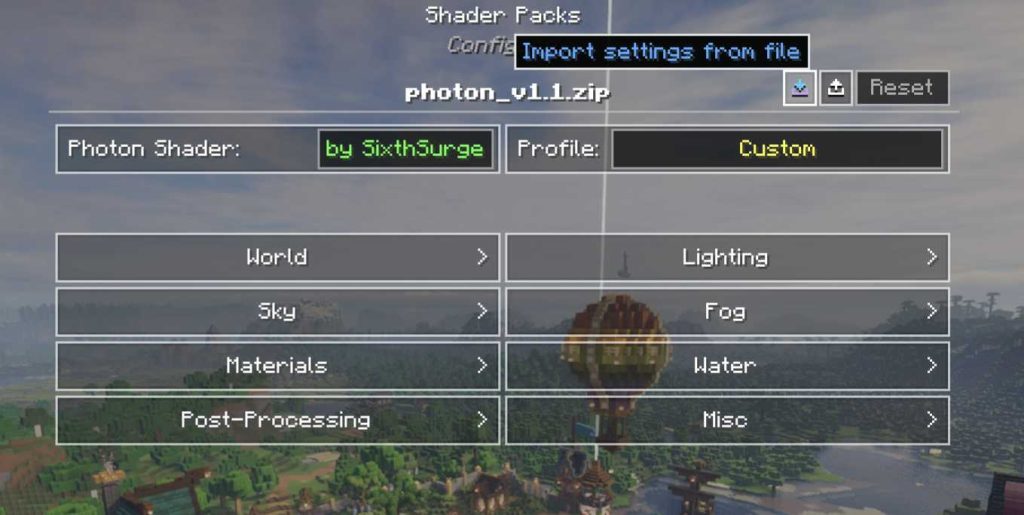
I would highly suggest using my settings for Photon 1.1 – it depths just a little bit more realism with a tough of DoF. You can download them by clicking here. Then you just open the modded minecraft (With all the mods installed), and then go to your pause menu –> Options –> Video Settings –> Shader Packs –> Shader Pack Settings –> and then click the import button towards the top. Select the downloaded file, and click apply button at the bottom of the shader pack settings:
The Modpack (Download)

I wanted to give you guys a way to get a “head start” on getting all this installed. So, I’ve created a modrinth modpack – which you can download below. See the list below for some pertinent information and the download link:

  • Modpack Format: .mrpack (Modrinth Modpack)

  • Mod Loader: Fabric (Version 0.16.12)
  • Minecraft Version: 1.21.4
  • Settings: The default settings for the modpack include the Photon Shader enabled (With my own custom settings), and decent default video settings. Be aware, the vanilla render distance is set to 8 (This is recommended for Distant Horizons).
  • Distant Horizon Settings: These settings are pretty much default, besides reducing the Distant Horizons LOD render distance from the default 256 down to 128 (To increase performance).

  • Important Note: If you use distant horizons in multiplayer – it will NOT show extended render distance by default. You must first manually visit a chunk for it to be put into it’s memory. Then it will show at extended render distances. Due to this, you may want to extend your vanilla render distance when you first start playing on a minecraft multiplayer server.
  • Download: You can download a copy of the pack by clicking here.

Frequently Asked Questions

You need to already have modrinth installed. Make sure it’s opened – and you’re signed into a minecraft account. Then (in most cases) you can just double click the .mrpack file – and it should automatically install. However, if you need to manually do it:

  1. Click the + icon on the left side of the modrinth launcher window (Create a new Instance).
  2. On the new window that appears switch away from Custom to From File.
  3. Click the Import from File button that appears.
  4. Select the modpack file you downloaded.
  5. Wait until the modpack is installed.
Currently, the only way for Distant Horizons to display a chunk on a server is if you first visit that chunk in order for it to be rendered and stored in memory. In the modpack, the default vanilla render distance is 8, but you may want to make it larger when you first begin playing on a server (In order to render more chunks into Distant Horizons).

Once you’ve rendered a chunk, it will display in the distance, unfortunately – this results in some unsightly holes in the landscape if you’re up high – until you’ve rendered significant portions of the map.

This may change in the future when the server support plugin comes out of beta (but right now it causes the server to crash, and has significantly reduced performance) – so you can only use the singleplayer mod rendering system on multiplayer.

Access your instance in modrinth, and use the content search bar to find it. You can then either delete it, or just disable it (This will keep your settings in case you want to re-enable it in the future).
This is likely because of your vertical/horizontal LOD quality settings. I left them as the default (Which are fairly balanced for performance). If you’d like to replicate my settings exactly:

  1. Pause The Game, or Go to Main Menu.
  2. Click Options Button.
  3. Click Distant Horizons Settings Button (No text- square button with icon to the left of the FOV Bar).
  4. Click Advanced Options Button.
  5. Click Graphics Button.
  6. Click Quality Button.
  7. Look for Max Horizontal Resolution + Vertical Quality options.

To match my exact settings the Max Horizontal Resolution should be set to 1. Block – and the Vertical Quality should be set to 6. Extreme – but be aware this WILL effect performance.

Leave A Comment

Off Topic – My Mod/Shader Setup

Published On: April 5, 2025/Categories: Off-Topic/

Hey Folks – Ken here,

I post a lot in the discord 📸︱screenshots channel. Mostly screenshots of the server, and various builds. In doing that, I’ve had some folks ask me about my shader setup. Today, I want to go over that in some detail.

To start off, I want to stress that I have a pretty high-end computer. It’s hardware is a couple generations old, but there’s not been significant headway in the hardware available since I purchased this computer. I want to list the specs below, just so that you’re aware of what I am working with. There are DEFINITELY things in this setup that you may need to change in order to have playable and consistent framerates, but I am going to go over some performance mods that I hope help with that too. Anyways, here are the specs for my desktop PC:

  • Operating System: Windows 11

  • Motherboard: Gigabyte Technology Co. Ltd. Z690 UD AX DDR4

  • CPU: 12th Gen Intel(R) Core(TM) i7-12700KF

  • GPU: NVIDIA GeForce RTX 3080

  • RAM: 32 GB DDR4
  • Storage: Samsung M.2 SSD

With all that being out of the way, let’s dive into what I use.

The Modrinth App/Launcher

I use modrinth to handle all my minecraft “instances”. It’s super easy to use, completely separate from the regular minecraft launcher. It supports Vanilla, Fabric, Forge, Neoforge and Quilt instances (My modded instance uses Fabric 1.21.1). It also lets you setup any version available for vanilla or the mod instances.

Then once you have an instance setup, you can go through mods, resource packs, and shaders – and it will automatically check for compatible versions with your modded instance, and version – to ensure you don’t have to manually figure it out. It also supports automatic updating for all the mentioned assets (One click button to auto update all to latest – but I still do this manually to ensure everything works still).

I am not going to cover this extensively, because it’s fairly simple to figure out, and there are tutorials everywhere (Here’s a good one that covers installing the app, using modpacks, and creating your own instances). I will however give you a modpack containing everything I use (as far as performance, and shaders) – at the bottom of this page.

The Performance/Visual Mods

Not all of these are necessary, but I am including everything I use for performance and visual elements to the game. The links will be to modrinth listings (because that’s what I use), but they may be available on other mod platforms:

There are many other mods I use for sound and item enhancements – but I want to make this the bare minimum to get shaders and performance mods. I may eventually do a full modpack you can download with every thing I use, but for now – this is a great starting point.

The Shaders

My shaders of choice are Photon V1.1 – it has THE BEST cloud system of any shader I’ve used, and one of the better lighting systems. It’s also got a great performance to look ratio. I am going to put a list with links to the main shader, and alternatives (and why you might use the alternatives):

  • 1
    Photon Shaders – The best by far, run this if you can. It will be included in the modrinth modpack towards the end of this page. I will also include a settings file that you can import (I customized the depth of field to be more realistic, and the water waves).
  • 2
    Complimentary Reimagined Shaders – A really solid substitute for Photon. Also has slightly better performance than Photon.
  • 3
    Bliss Shaders – Has an INCREDIBLE end world effect, and a pretty good nether (Both beat Photon), but the over world lighting is rough, and the non-development version does not support distant horizons. Performance is usually worse than Photon.
  • 4
    MakeUp Shaders – I have not personally tested this, but it looks solid – while claiming it has great performance. Based on it’s downloads, I think this is likely a good alternative if you can’t run the others well.

I would highly suggest using my settings for Photon 1.1 – it depths just a little bit more realism with a tough of DoF. You can download them by clicking here. Then you just open the modded minecraft (With all the mods installed), and then go to your pause menu –> Options –> Video Settings –> Shader Packs –> Shader Pack Settings –> and then click the import button towards the top. Select the downloaded file, and click apply button at the bottom of the shader pack settings:

The Modpack (Download)

I wanted to give you guys a way to get a “head start” on getting all this installed. So, I’ve created a modrinth modpack – which you can download below. See the list below for some pertinent information and the download link:

  • Modpack Format: .mrpack (Modrinth Modpack)

  • Mod Loader: Fabric (Version 0.16.12)
  • Minecraft Version: 1.21.4
  • Settings: The default settings for the modpack include the Photon Shader enabled (With my own custom settings), and decent default video settings. Be aware, the vanilla render distance is set to 8 (This is recommended for Distant Horizons).
  • Distant Horizon Settings: These settings are pretty much default, besides reducing the Distant Horizons LOD render distance from the default 256 down to 128 (To increase performance).

  • Important Note: If you use distant horizons in multiplayer – it will NOT show extended render distance by default. You must first manually visit a chunk for it to be put into it’s memory. Then it will show at extended render distances. Due to this, you may want to extend your vanilla render distance when you first start playing on a minecraft multiplayer server.
  • Download: You can download a copy of the pack by clicking here.

Frequently Asked Questions

You need to already have modrinth installed. Make sure it’s opened – and you’re signed into a minecraft account. Then (in most cases) you can just double click the .mrpack file – and it should automatically install. However, if you need to manually do it:

  1. Click the + icon on the left side of the modrinth launcher window (Create a new Instance).
  2. On the new window that appears switch away from Custom to From File.
  3. Click the Import from File button that appears.
  4. Select the modpack file you downloaded.
  5. Wait until the modpack is installed.
Currently, the only way for Distant Horizons to display a chunk on a server is if you first visit that chunk in order for it to be rendered and stored in memory. In the modpack, the default vanilla render distance is 8, but you may want to make it larger when you first begin playing on a server (In order to render more chunks into Distant Horizons).

Once you’ve rendered a chunk, it will display in the distance, unfortunately – this results in some unsightly holes in the landscape if you’re up high – until you’ve rendered significant portions of the map.

This may change in the future when the server support plugin comes out of beta (but right now it causes the server to crash, and has significantly reduced performance) – so you can only use the singleplayer mod rendering system on multiplayer.

Access your instance in modrinth, and use the content search bar to find it. You can then either delete it, or just disable it (This will keep your settings in case you want to re-enable it in the future).
This is likely because of your vertical/horizontal LOD quality settings. I left them as the default (Which are fairly balanced for performance). If you’d like to replicate my settings exactly:

  1. Pause The Game, or Go to Main Menu.
  2. Click Options Button.
  3. Click Distant Horizons Settings Button (No text- square button with icon to the left of the FOV Bar).
  4. Click Advanced Options Button.
  5. Click Graphics Button.
  6. Click Quality Button.
  7. Look for Max Horizontal Resolution + Vertical Quality options.

To match my exact settings the Max Horizontal Resolution should be set to 1. Block – and the Vertical Quality should be set to 6. Extreme – but be aware this WILL effect performance.

Leave A Comment